Quickture Reader 1.0.0 (80) brings new features and security across the board.
We’ve improved the responsiveness of playback and navigation via double-tapping lines or dragging the audio scrubber.
Audio is downloaded and saved on your device when you first open a script. If you the go offline or turn on Airplane mode, you’ll still be able to play your audio.
Quickture Reader will continue playing your audio if you switch to another app or lock your device (just like Spotify or the Apple Podcasts app).
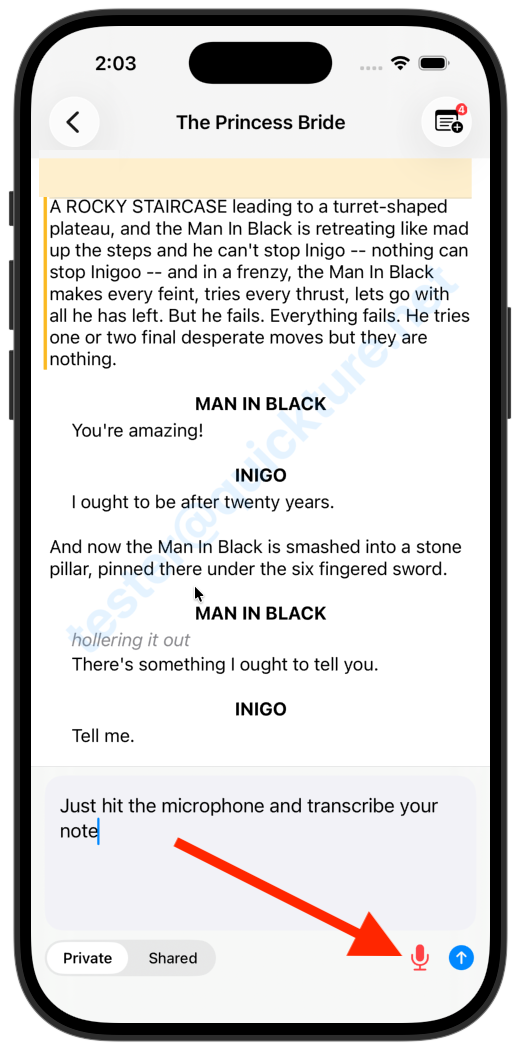
We improved the voice note experience so you can open a note, tap the microphone, and transcribe your voice note easily and accurately. This even works in airplane mode!
The following known issues exist in this release and will be fixed asap:
Deleting screenplays is broken on iOS. It works as expected in the web view and we’ll fix it soon!
The voice chat functionality, accessed via the other microphone icon, is still a not-so-great experience. It can summarize and give some info, but navigation around the screenplay, or adding notes via chat, are no fun. We’re prioritizing this in the next build.