Quickture Reader 1.0.4 delivers an improved UI for Notes and also allows you to export notes to a notes report in pdf or Excel, and an annotated pdf of your original screenplay. We also fixed a critical bug that led to rare but serious hallucinations on script pages.
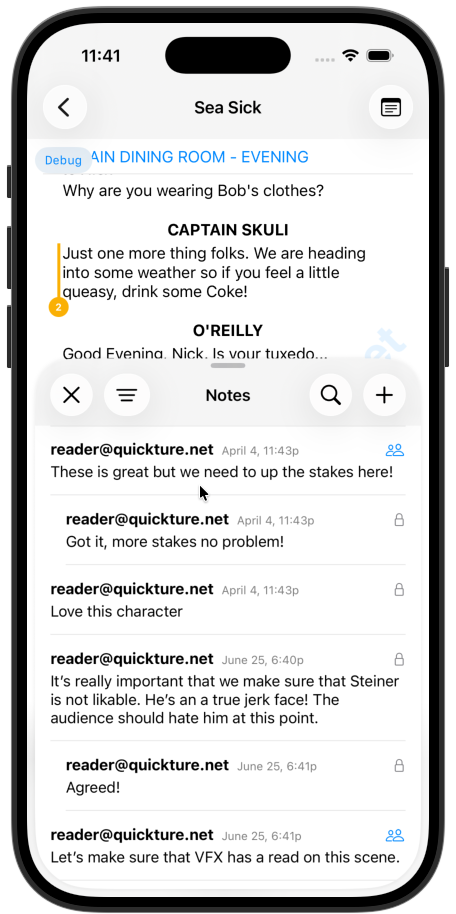
The new notes view features a cleaner threaded view of notes that shows conversations and allows you to easily jump to the relevant part of the screenplay just by tapping a note.
Tap a note to scroll to it in the screenplay.
Tap and hold a note to edit it, delete it, or add a reply.
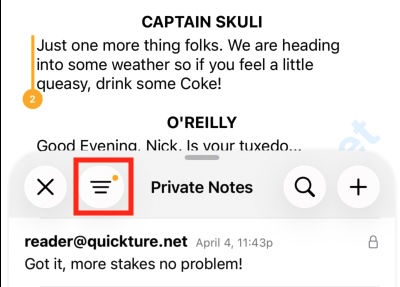
Tap the filter button to show only your private notes, or only your shared notes.
Tap the magnifying glass and type in the search window to find specific notes.
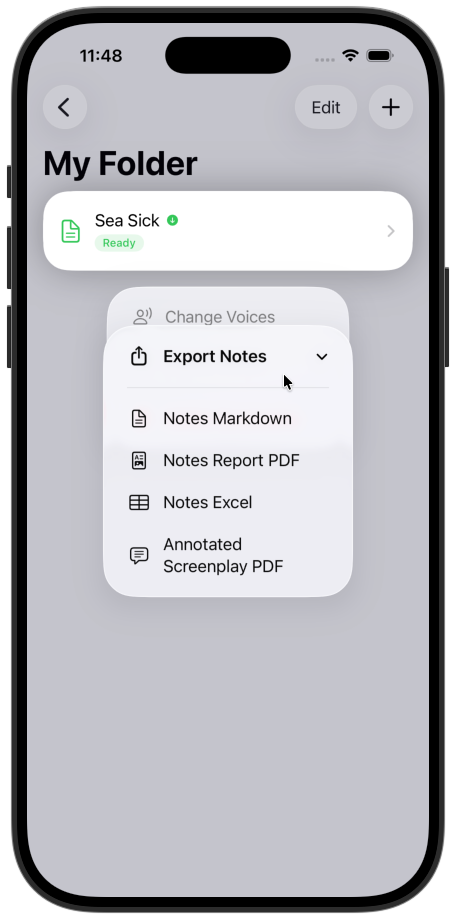
Reader lets you export your notes in various formats! In the screenplay list, tap and hold a screenplay to bring up the Export Notes options.
All notes exports include information on the Page, Scene, and screenplay element that the note refers to, who wrote it, and text of the note.
Notes Markdown - This exports a text version of the notes in Markdown.
Notes Report PDF - A PDF report of the notes in the screenplay.
Notes Excel - An Excel spreadsheet report of the notes, with each note in an individual row.
Annotated Screenplay PDF - Your original uploaded PDF with notes added as annotations (the little sticky notes).
Quickture now allows you to import .fdx files. This delivers faster import (just a little faster, but your time is precious!) and guarantees 100% accurate reproduction of every script element.
Hallucinations - We did a complete overhaul on our script ingestion work flow to eradicate hallucinations and review every page for accuracy.